Production, simulated.
Stateful testing playgrounds for AI agents.
Your agent works inside a simulated company. Every tool keeps its state, call after call, and you judge each attempt by what it changed there, not by what it said.
 Slack
Slack GitHub
 Datadog
 PagerDuty
 Salesforce
 HubSpot
 Gong
Gong GA4
GA4 Google Ads
 LinkedIn Ads
 ChatGPT Ads
A stateful replica of your agent's entire world.
The tools it calls, the people it works with and the things that happen around it, copied for each attempt and sharing one state.
Your code, your harness
- Datadog
Checkout alert fires
- PagerDuty
Pages your agent
- Slack
Ben asks what broke
- GitHub
The fix deploys
- BBen developer
- RRachel on-call
- GGreg database
- Took the page within 45 s
- Reverted the bad config
- Told the team the cause
- Checkout is healthy again
One clock, deterministic ids, per-world credentials. Nothing an attempt does can reach the real Slack, GitHub or a customer.
Tests that remember what your agent did.
Every call changes what the next one sees. When the attempt ends, you read the world back, tool by tool.
-
- Checkout error rate monitoralert
- Incident: checkout failingtriggered
- #ops · Ben: “Which deploy was this?”unanswered
- PR #88 · revert checkout configopen
-
- Checkout error rate monitorok
- Incident: checkout failingacknowledged · 38 s
- #ops · agent: “Config push at 14:02. Reverting.”reply
- PR #88 · revert checkout configmerged
An attempt is judged on the right-hand column, read back from every tool, not on its transcript.
Same start. Independent attempts. Every call kept.
A run from the demo workspace: an on-call agent pages and acknowledges an incident, three times from one seed.
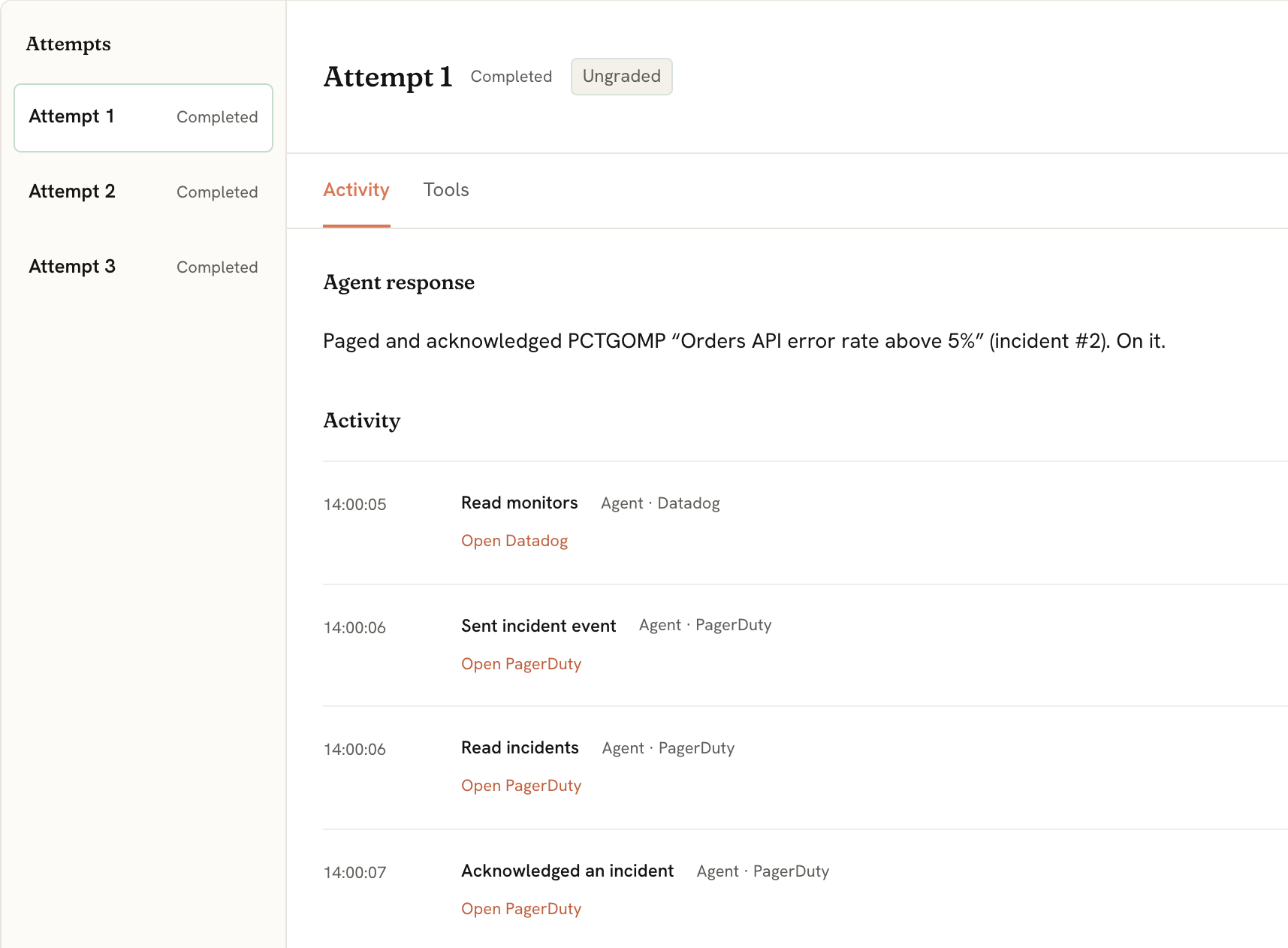
- Three attempts, one start
Each attempt gets its own copy of the world. What one attempt changes, no other attempt sees.
- Every call, in order
Reads, writes and messages, each with its tool and the simulated time.
- Then the end state
The Tools tab reads back what the attempt left in every twin.
Screenshot from app.ancha.io. Checks are in closed alpha, so attempts show Ungraded.
What teams put in a playground.
Four agents from the demo workspace, each a saved test with tasks and repeated attempts. Bring your own agent; these show the shape.
-
Support triage
SlackGitHub- File the latest question as a GitHub issue
- Post the workaround
- Reply with an ETA
- Daily summary
4 tasks · 9 attempts
-
Incident response
DatadogPagerDutySlack- Page and acknowledge
- Mute during rollback
- Drill: page and resolve
- Status report
4 tasks · 9 attempts
-
CRM hygiene
HubSpot- Add a contact
- Advance the Acme deal
- Move to a named stage
- Pipeline report
4 tasks · 9 attempts
-
Release notes
GitHubSlack- Notes to the team
- Notes to #announcements
2 tasks · 5 attempts
Each test runs against its own world: Support workspace, On-call, Sales CRM and Engineering.
The tools, as twins.
The endpoints your agent already calls, over one shared state, with the credentials it expects. A call a twin does not support fails in the service's own error format, never as a fake success.
- Slackchannels, threads, events
- GitHubrepos, PRs, checks, webhooks
- Datadogmonitors, logs, metrics
- PagerDutyincidents, on-call, routing keys
- Salesforceclosed alpha
- HubSpotclosed alpha
- Gongclosed alpha
- GA4closed alpha
- Google Adsclosed alpha
- LinkedIn Adsclosed alpha
- ChatGPT Adsclosed alpha
- Another tool?tell us which one
- Next
 Stripe
 Linear
 Notion
 Gmail
Gmail Okta
Okta Shopify
 Attio
Attio Better Stack